
There’s no shortage of online text editors. Google Docs, Notion, Coda… they all require an account, a subscription, and your data ends up on a server somewhere between Virginia and Ireland. ZORD takes the opposite approach: it’s a professional A4 word processor that runs entirely in your browser — no server, no account, no sign-up.
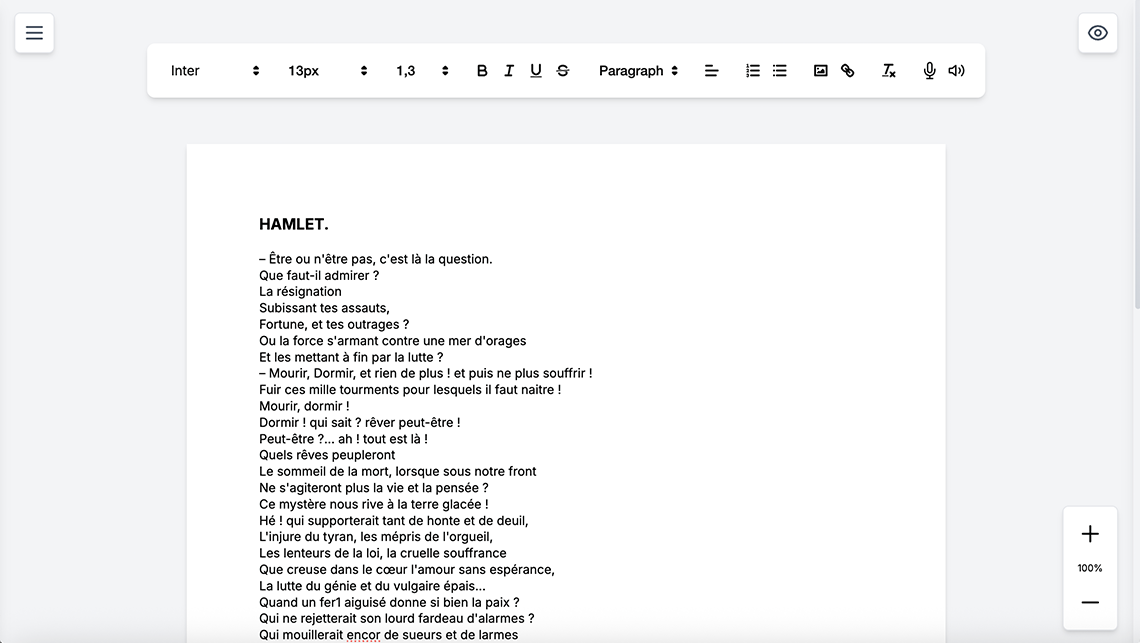
A Real A4 Editor — Not a Glorified Notepad
The first thing you notice when opening ZORD is that you’re looking at a real A4 page. Not an infinite text area, not a minimalist canvas: a 210 × 297 mm page with automatic pagination, exactly matching what you’ll get when you print. Pages are created as you type, thumbnails appear in the sidebar, and the final output matches the PDF pixel-for-pixel.
Formatting-wise, all the essentials are there: bold, italic, underline, strikethrough, five heading levels (H1–H5), bulleted and numbered lists, alignment, text colors, and a selection of fonts (Inter, Arial, Times New Roman, Space Mono, Crimson Pro). Sizes range from 8 pt to 72 pt — more than enough to cover body text to poster headlines.
Multi-Document Management and Invisible Saving
ZORD manages multiple documents simultaneously. The left sidebar displays your file list, and switching between them takes a fraction of a second. Data is stored in IndexedDB (the database engine built into your browser), with a localStorage safety net. In other words: your documents survive browser closures, reloads, and even power outages thanks to an automatic emergency backup system.
Four save modes are available:
- IndexedDB — automatic, transparent saving
- JSON — download a local file
- Pinata (IPFS) — decentralized storage on the IPFS network
- .zord — native format, exportable and re-importable
AI as a Copilot, Not a Crutch
ZORD integrates an AI assistant supporting four providers: Claude (Anthropic), GPT (OpenAI), Gemini (Google), and Mistral. You bring your own API key — ZORD stores nothing server-side, and calls go through a minimal PHP proxy (or directly if CORS allows it).
The AI understands your document’s context: it knows you’re in an A4 editor, it detects headings and formatting, and it inserts generated text directly at the cursor. It’s a writing copilot, not a gimmick bolted on top.
WebRTC Collaboration: Peer-to-Peer Without a Server
Need to write with others? ZORD ships with a real-time collaboration system via WebRTC. Direct browser-to-browser connection, end-to-end encrypted, no intermediary server. The host generates a session code, guests enter it, and edits sync live. Remote cursors are visible in real time with distinct colors.
Professional Export
When the document is ready:
- PDF via system print (Ctrl+P) — pixel-accurate
- DOCX with full formatting (bold, italic, headings, lists, colors, images) — compatible with Word, LibreOffice, Google Docs
- JSON for backup and migration
- IPFS for permanent decentralized archiving
French Typography Correction
For French-speaking writers, ZORD includes an automatic typographic correction module: non-breaking spaces before colons, semicolons, exclamation and question marks; French guillemets « »; triple dots replaced with the ellipsis character…; and straight apostrophes converted to curly ones. A spelling/grammar checker via public API (LanguageTool) rounds out the toolkit.
Privacy-First: Your Data Never Leaves Your Machine
This is arguably the most important point: ZORD has no server. No backend, no cloud database, no tracking, no third-party cookies. Your documents live in your browser and nowhere else. The only outbound connections are the ones you choose to enable: AI APIs (with your key), Pinata IPFS (with your token), or WebRTC (direct peer-to-peer).
You can even use ZORD offline: download the folder, open index.html in your browser, and you’re good to go. No npm install, no build step, no Docker. One folder, one HTML file, that’s it.
Dark Mode, Mobile, and the Small Details
The interface switches between light and dark mode (automatic or manual). On mobile, the toolbar reorganizes with a drawer for secondary tools and comfortable touch targets. Zoom works via pinch or dedicated buttons. Invisible characters (spaces, line breaks) can be displayed for precision work. And keyboard shortcuts cover the essentials: Ctrl+B/I/U, Ctrl+S to save, Ctrl+P to print.
Who Is It For?
- Writers who want a simple tool for articles, reports, or theses
- Freelancers who need to edit quotes, letters, or contracts without installing Office
- Developers looking for a lightweight web editor to integrate or customize
- Privacy advocates who refuse to let their documents pass through a cloud
- Teachers and students who want a free Word alternative accessible from any browser